TeleTraff: How to run mass reactions in Telegram?
The module places reactions in your targets: it either walks through already published messages or keeps targets under observation and reacts to new ones as they appear.
The module overview lives on the mass reactions page.
What you need before launch
Section titled “What you need before launch”- Accounts with proxies, preferably warmed up.
- A list of channels or chats — entered manually or as a ready dataset.
How to launch
Section titled “How to launch”-
Choose the scenario.
Scenario What it does From a ready list accounts walk through your targets and react to existing messages Watch for new the module keeps targets under observation and reacts to fresh messages -
Set the emoji set and the probability.
The set can be anything — the panel picks from your selection in random order.
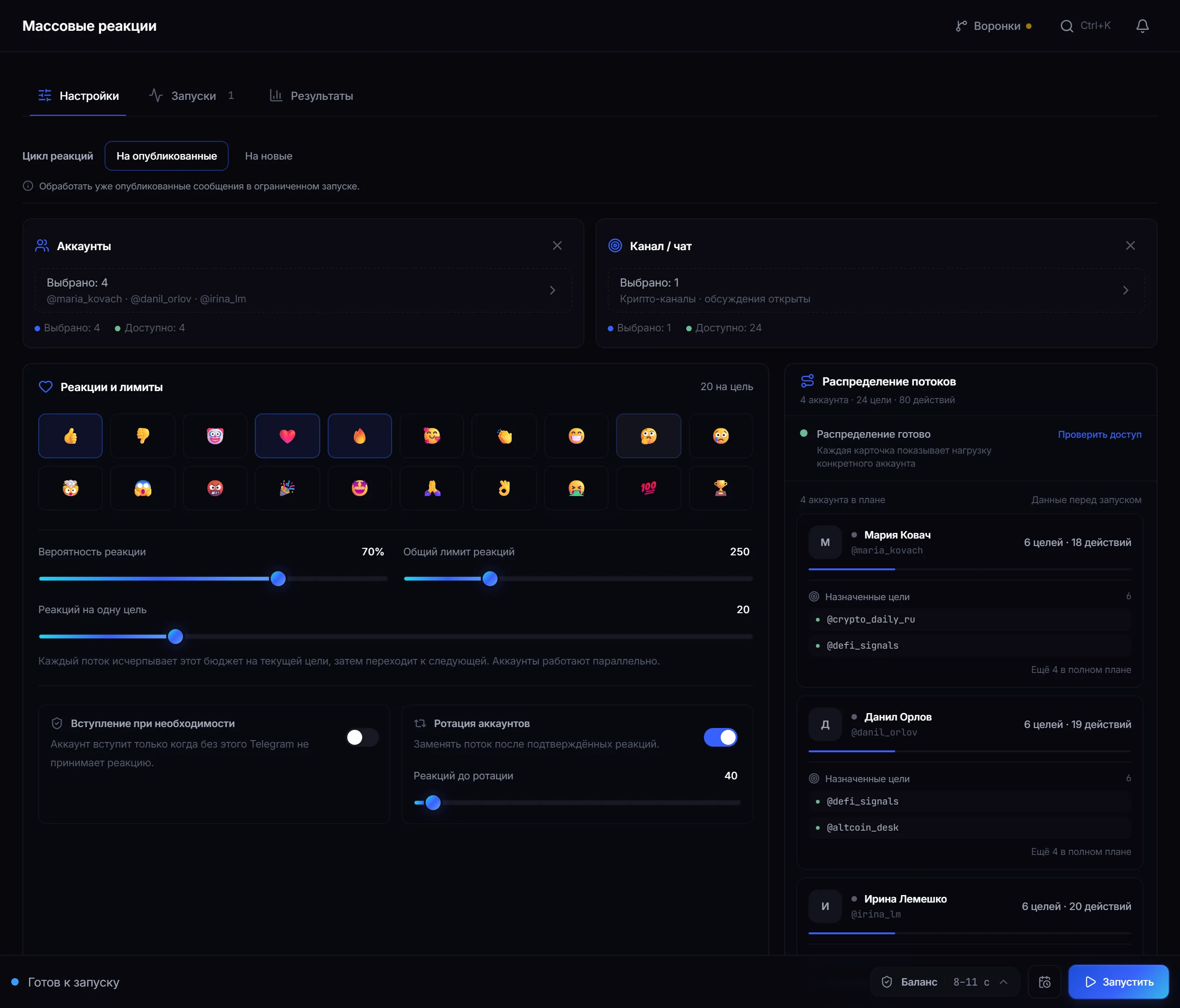
Settings: reaction set, probability, limits and thread distribution across accounts. -
Set limits and rotation.
- Reactions per target — how many an account places in the current channel before moving on.
- Total reaction limit — the ceiling for the whole run.
- Rotation — an account gives way to the next after a set number of reactions, so one does not consume the whole limit.
- Join the target — a separate toggle for when Telegram requires membership to react. Without that requirement the account joins nothing.
-
Start it and watch the result.
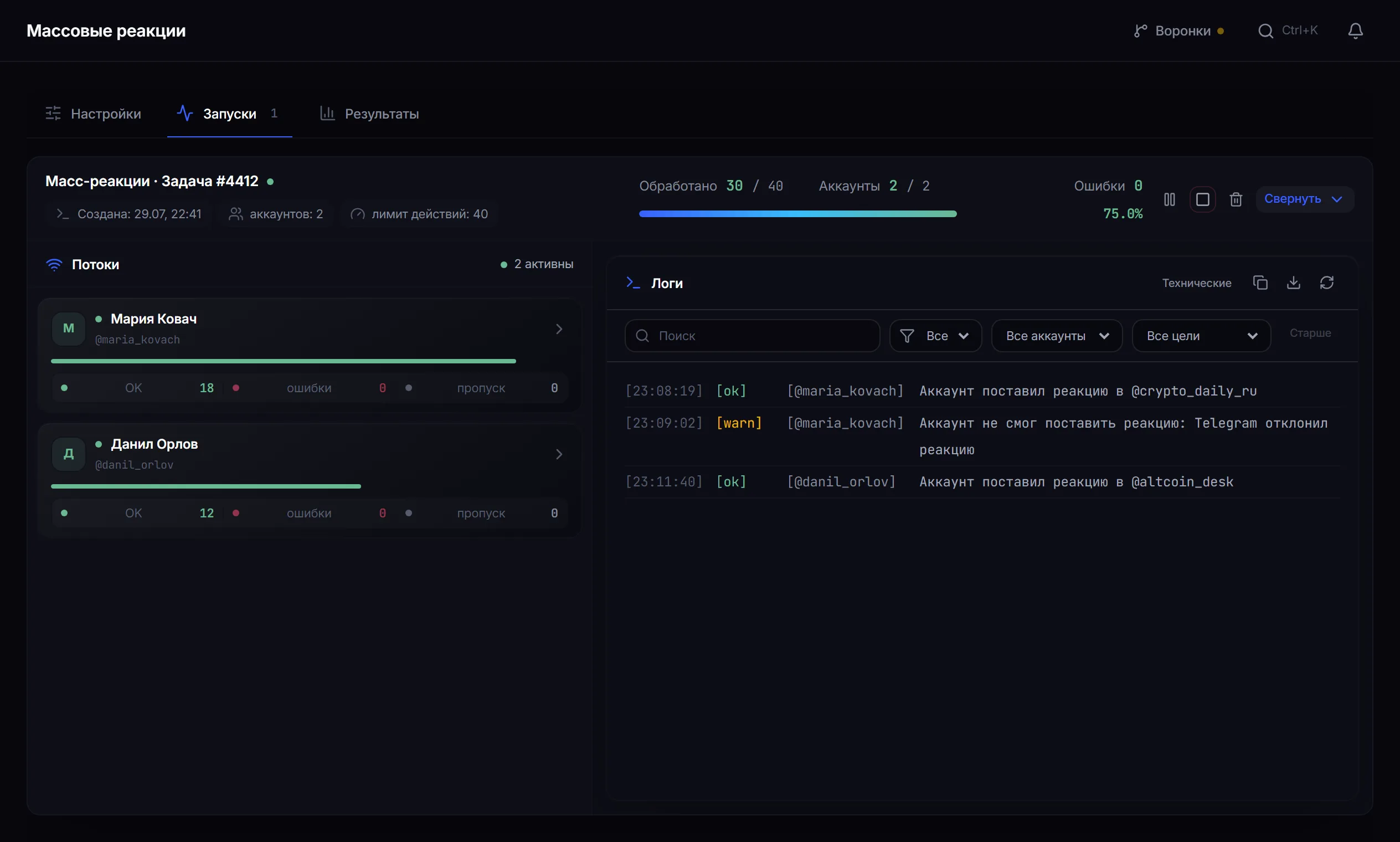
Runs: how many reactions each account placed and an event log by target.
Why reactions are not placed on everything
Section titled “Why reactions are not placed on everything”Reaction probability is the main naturalness control.
Reactions on behalf of a channel
Section titled “Reactions on behalf of a channel”A separate mode: the reaction comes from the account’s personal channel rather than the account itself.
- Telegram Premium on the account and its personal channel are required.
- The panel shows in advance how many selected accounts meet the conditions.
- Accounts without Premium simply do not take part in this mode.
A safe test run
Section titled “A safe test run”- Take two accounts and a channel of your own with open reactions.
- Lower the probability well below one hundred and set small limits — per target and total.
- Run it and read the log: some messages should stay without a reaction.
- Check that the reactions vary rather than repeating one emoji.
Why a reaction may not have gone through
Section titled “Why a reaction may not have gone through”- Reactions are disabled for everyone on the target.
- Reactions are forbidden for this account there.
- Telegram’s own reaction limit was reached.
- Telegram requires joining the chat and joining is turned off.
- Telegram asked to wait (FloodWait) — the thread pauses.
Refusals appear in the log with a reason: it is immediately clear whether the target or the account is at fault.
Common mistakes
Section titled “Common mistakes”| Mistake | What happens |
|---|---|
| One hundred per cent probability | the clearest sign of automation |
| The whole total limit on one account | the load is not spread across the fleet |
| Targets where reactions are closed | the run does nothing |
Limits and platform rules
Section titled “Limits and platform rules”Reactions are a public action in someone else’s community. Place them where such activity is appropriate, and remember that Telegram’s rules and the specific channel’s rules take precedence over job settings. See Responsible use.
How many reactions can one run place? The total run limit and the per-target limit are set with sliders, and the panel shows the ceiling next to them. Keep both well below it: the point is evenness, not volume.
Why did some reactions fail? Common causes: reactions are off on the target, forbidden for the account there, Telegram’s limit was reached, or the account is not in the chat. The exact reason is in the results.
Is Telegram Premium required? Not for ordinary reactions. Premium is only needed for the personal-channel mode.
What probability should I set? Noticeably below one hundred. The exact value is tuned on a small run for your topic; one hundred per cent is best avoided entirely.
What is rotation for? So one account does not consume the whole limit: after a set number of reactions it gives way to the next.
What does joining the target do? If Telegram will not accept a reaction from a non-member, the account joins first and then reacts.
Related guides
Section titled “Related guides”- How to run story views in Telegram? — the neighbouring module
- How to run AI commenting in Telegram? — a more visible presence
- How to warm up Telegram accounts?
Official module page: Mass reactions