TeleTraff: How to manage Telegram accounts in TeleTraff?
The account manager is the inventory of your whole fleet: which accounts exist, what state they are in, which proxy each one has and who is currently busy with a job. Preparation for any launch starts here.
The section overview lives on the account manager page.
What you can do here
Section titled “What you can do here”-
Import accounts.
Accounts are added to the panel and land in the shared inventory.
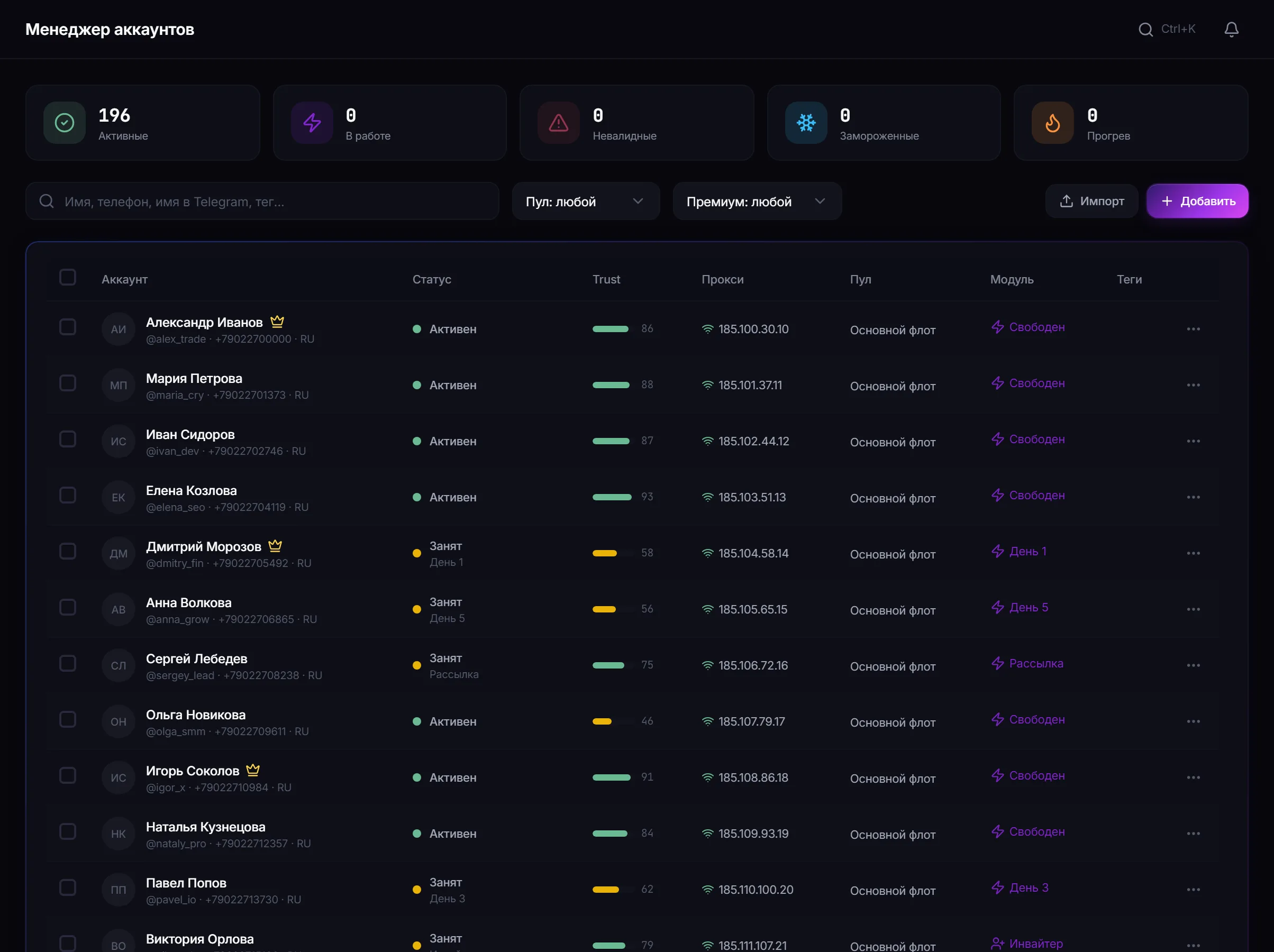
Account inventory: status, bound proxy, pool and the current occupation of each account. -
Read each account’s status.
The panel shows the observed state, not the desired one. If an account has been restricted, it will show here, and no job setting will change that.
-
Filter a selection for the job.
Filters by state, pool, premium status and occupation let you quickly assemble a group of accounts fit for a specific launch.
-
Run batch actions on the selected accounts without opening each one.
Account occupation
Section titled “Account occupation”One account cannot run two conflicting jobs at once. If an account is busy with warmup, it cannot be put on a working module — the occupation column shows this before you build a selection.
Preparing a new account
Section titled “Preparing a new account”- Import the account.
- Assign a proxy immediately — before the first action in Telegram.
- Fill in the profile: name, avatar, bio. The panel does not do this for you.
- Run warmup matched to the account’s age.
- Only then put it on working modules.
Common mistakes
Section titled “Common mistakes”| Mistake | What happens |
|---|---|
| The account went to work before a proxy was bound | it cannot be fixed retroactively |
| An empty profile | the account looks uninhabited to the platform and to people |
| A selection that ignores occupation | some accounts will not be picked up by the job |
| Expecting the panel to “fix” a restricted account | the status reflects the platform’s decision |
Limits and platform rules
Section titled “Limits and platform rules”The panel shows account state but does not control Telegram’s decisions. A restriction imposed by the platform is not lifted by job settings. See Security.
What does an account status mean? The observed state on Telegram’s side, not the desired one. The panel does not pass an account off as healthy if the platform thinks otherwise.
Why can’t an account be selected for a job? Usually it is busy with another job or has no proxy.
Can accounts work without a proxy? No. Without a proxy an account will not run.
Does the panel fill in the account profile? No. The name, avatar and bio are yours to fill in.
Related guides
Section titled “Related guides”- How to set up proxies for Telegram accounts? — the mandatory next step
- How to build an account pool? — when one selection is needed regularly
- How to warm up Telegram accounts?
- Getting started
Official section page: Account manager