TeleTraff: How to set up proxies for Telegram accounts?
The proxy centre stores proxies, shows their observed state and lets you assign them to accounts. Without a proxy an account will not run in any module.
The section overview lives on the proxy centre page.
The one rule that matters
Section titled “The one rule that matters”How to set it up
Section titled “How to set it up”-
Import your proxies.
Proxies are added as a list. The inventory shows the address, country and provider, along with search and a country filter.
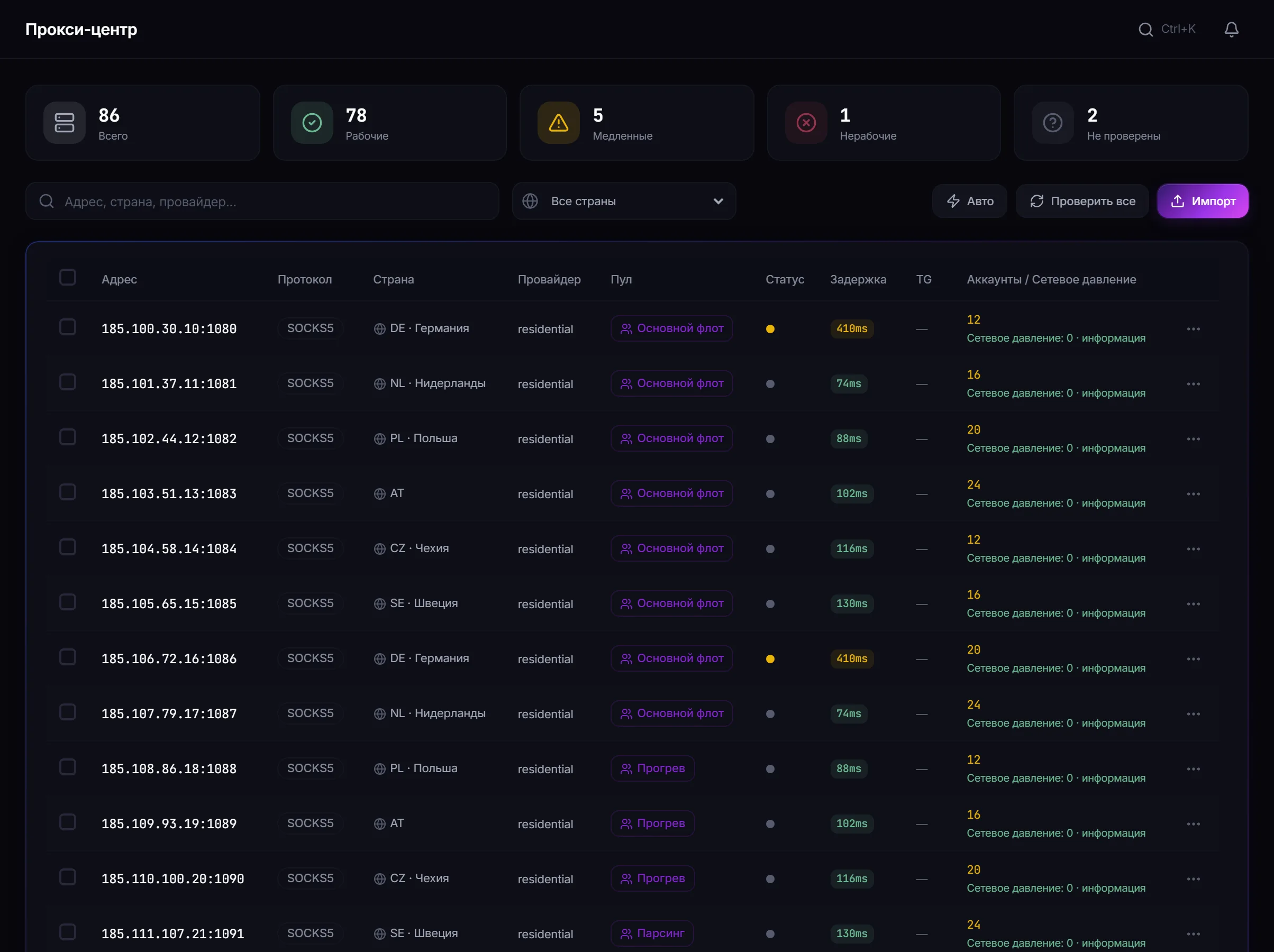
Proxy inventory: address, country, latency and how accounts are distributed across proxies. -
Assign proxies to accounts.
Assignment works one by one or in bulk — selecting several proxies and adding accounts. The panel shows how many accounts fall on a proxy: that figure, network pressure, is worth keeping under control.
-
Watch the state.
The panel shows the observed status and latency. A proxy with growing latency or frequent drops is a candidate for replacement before it derails a job.
-
Replace failing proxies.
You can swap an account’s proxy for another from the inventory, optionally removing the old one.
How many accounts per proxy
Section titled “How many accounts per proxy”There is no single correct number, but the principle is simple: the more accounts go through one address, the more tightly they are linked from the platform’s point of view. Telegram’s limits apply to account behaviour rather than to proxies — but a shared address makes a group of accounts visible as a group.
The panel shows the distribution so that an imbalance is visible before a job starts.
A safe test run
Section titled “A safe test run”- Import one proxy and assign it to one new account.
- Run a short 30-minute warmup.
- Confirm the actions go through and the proxy latency is stable.
- Only then scale the pairing to the rest of the fleet.
Common mistakes
Section titled “Common mistakes”| Mistake | What happens |
|---|---|
| The account reached Telegram before a proxy was bound | it cannot be fixed retroactively |
| Too many accounts on one address | the group of accounts becomes visible as a group |
| A dropping proxy left in place “for now” | it will derail a job at the worst moment |
| Proxy country that does not match the account | one more reason for the platform to look closer |
Limits and platform rules
Section titled “Limits and platform rules”A proxy is transport, not protection. It does not make automation permitted and does not override Telegram’s rules: restriction decisions are made on account behaviour. See Security.
Is a proxy mandatory for every account? Yes. Without a proxy the account will not run.
When should the proxy be bound? Before the account’s first action in Telegram.
Can an account’s proxy be changed? Yes, it can be swapped for another from the inventory, optionally removing the old one.
How many accounts should share one proxy? There is no universal number. The fewer, the less the accounts are linked to each other. The panel shows the distribution so imbalance is visible in advance.
What does latency show? The observed response time. Growing latency is a signal to replace the proxy before a job starts.
Related guides
Section titled “Related guides”- How to manage Telegram accounts in TeleTraff? — where proxies are assigned
- How to warm up Telegram accounts? — the first task after binding
- Getting started — the full preparation order
- Security
Official section page: Proxy centre