TeleTraff: How to run AI chat in Telegram?
AI chat puts your accounts into conversations in selected chats: they reply according to the rules and instruction you set. Unlike AI commenting, where a reply is left under a post, this is a live dialogue.
The module overview lives on the AI chat page.
What you need before launch
Section titled “What you need before launch”- Warmed-up accounts with proxies. A dialogue demands more of an account than a single action.
- A dataset of target chats your accounts can reach.
- Access to a language model — the panel’s shared provider or your own key.
- A clear conversation goal. Without one the model will write polite emptiness.
How to launch
Section titled “How to launch”-
Select accounts and the dataset of target chats.
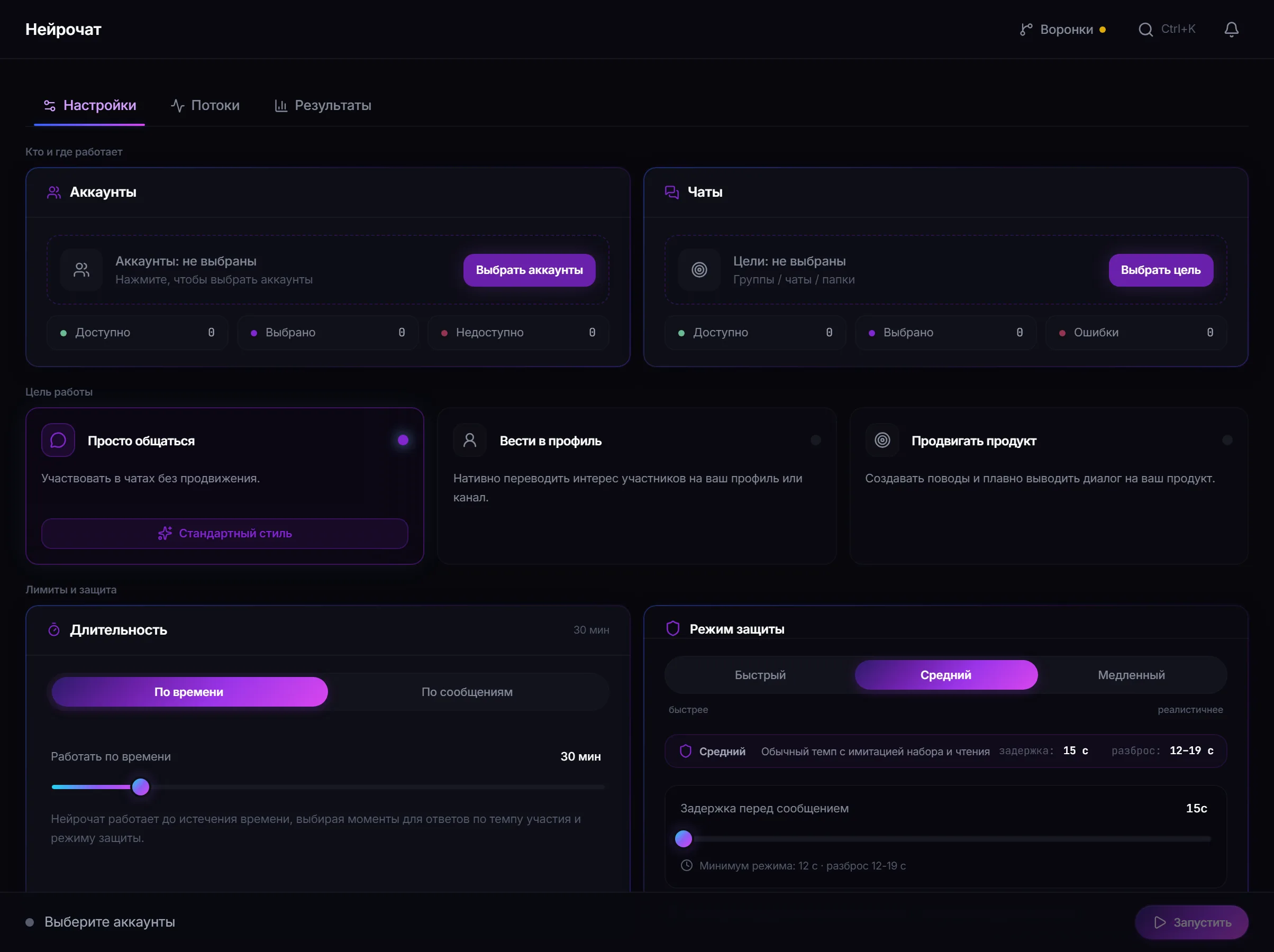
AI chat settings: accounts, target chats, conversation goal, rules and prompt. -
Set the conversation goal and the rules.
The goal defines what the account steers the conversation towards. The rules set the boundaries: when to join a dialogue and when to stay quiet.
-
Write the prompt.
Describe who is speaking and why they are in this chat. Ask for short replies on topic and explicitly forbid filler phrases — those are what give automation away.
-
Check the target and the text preview before launch.
-
Start the job and review the results.
How to sound natural
Section titled “How to sound natural”A live participant does not answer everything, sometimes stays quiet and speaks to the point. That is exactly what the rules for joining a dialogue are for.
A safe test run
Section titled “A safe test run”- Take one warmed-up account and a test chat of your own.
- Set a narrow conversation goal and a short prompt.
- Write a few messages from another account and watch how the module replies.
- Judge the text as a chat participant would, not as an operator: does it read like a person?
Why an account may not have replied
Section titled “Why an account may not have replied”- The rules did not call for joining that dialogue.
- The model did not respond or returned empty text — no placeholder is substituted.
- The account hit its action limit or is waiting out a pause.
- The chat is unavailable to the account, or sending is restricted there.
- Telegram asked to wait (FloodWait) — the thread pauses.
Common mistakes
Section titled “Common mistakes”| Mistake | What happens |
|---|---|
| Replying to every message | the clearest sign of a bot in a chat |
| One prompt for all accounts | replies become recognisably identical |
| An insistent goal in every reply | participants and moderators react quickly |
| Launching on accounts that were not warmed up | restrictions arrive before results |
Limits, user consent and platform rules
Section titled “Limits, user consent and platform rules”AI chat holds conversations with real people on your behalf — the most sensitive form of automation in the panel.
- Take part only in chats where such activity is appropriate and not forbidden by community rules.
- Do not pass automated answers off as expert consultation where a person expects a live specialist.
- Responsibility for what is said lies with the operator: an instruction to a model does not remove that.
- Telegram’s rules and the rules of the specific chat take precedence over job settings.
See Responsible use.
How does AI chat differ from AI commenting? AI commenting leaves a reply under a new channel post. AI chat takes part in a dialogue in a chat.
Can it work without an AI provider? No. Replies are generated by a model, so access to one is required.
What if the model does not respond? No message is sent and the reason stays in the results. No template placeholder is substituted.
Does the account reply to every message? Not if the rules are set sensibly. Replying to everything is the main sign of a bot.
Can I stop a single account? Yes, pause and stop apply to an individual line.
Related guides
Section titled “Related guides”- How to run AI commenting in Telegram? — the neighbouring AI module
- How to run messaging in Telegram? — when you need one message, not a dialogue
- How to warm up Telegram accounts?
- Responsible use
Official module page: Telegram AI chat