TeleTraff: How to run inviting in Telegram?
The inviter invites people from a collected dataset into your channel or group. Before launch the panel checks whether each selected account can actually invite into that target.
The module overview lives on the inviter page.
What you need before launch
Section titled “What you need before launch”- Accounts with proxies. Without a proxy an account will not run.
- A dataset of people, not channels. The inviter invites people — results of parsing members or commenters will do.
- A target your accounts can already invite into. The panel does not grant or revoke admin rights — you do that inside Telegram.
- Readiness for the fact that some people will not join for reasons outside the panel’s control — their privacy settings, for example.
How to launch
Section titled “How to launch”-
Select the dataset, accounts and target.
The target can be an existing channel or group — the panel will check your accounts’ access. Alternatively you can create a new channel: the panel creates a real one with one of your accounts and only uses it after a confirmed result. The target can be changed right up to launch; after a change the permission check runs again.
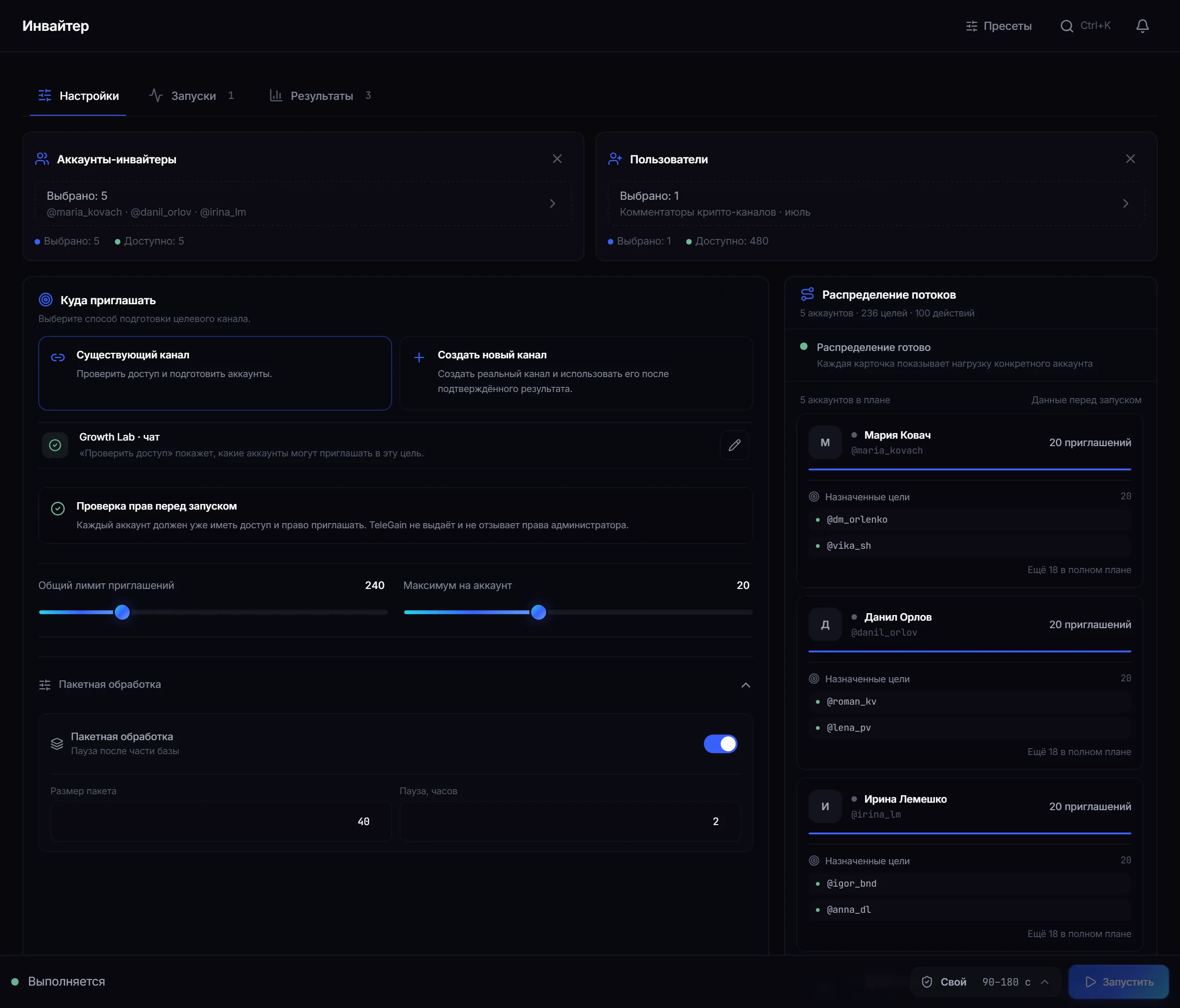
Settings: inviter accounts, the user dataset, the target channel, two limits and thread distribution. -
Wait for the permission check.
The check runs on every selected account, not a sample. Until at least one account is confirmed, the launch button stays disabled — so the job never starts on accounts whose rights are unknown.
The check runs in batches, so a large selection takes longer. There is no cap on the number of accounts: you wait longer, but the selection is not trimmed.
-
Set the two limits — and see what they actually produce.
“Total invitations” is the ceiling for the whole job. “Maximum per account” is the ceiling for one account. Whichever runs out first is the one that applies.
-
Set the pace and the FloodWait policy.
Three pause presets between invites — fast, balanced and cautious; the panel shows the range in seconds next to each. Any custom value switches the mode to “Custom”. The pause always carries a spread: consecutive actions never repeat the same interval.
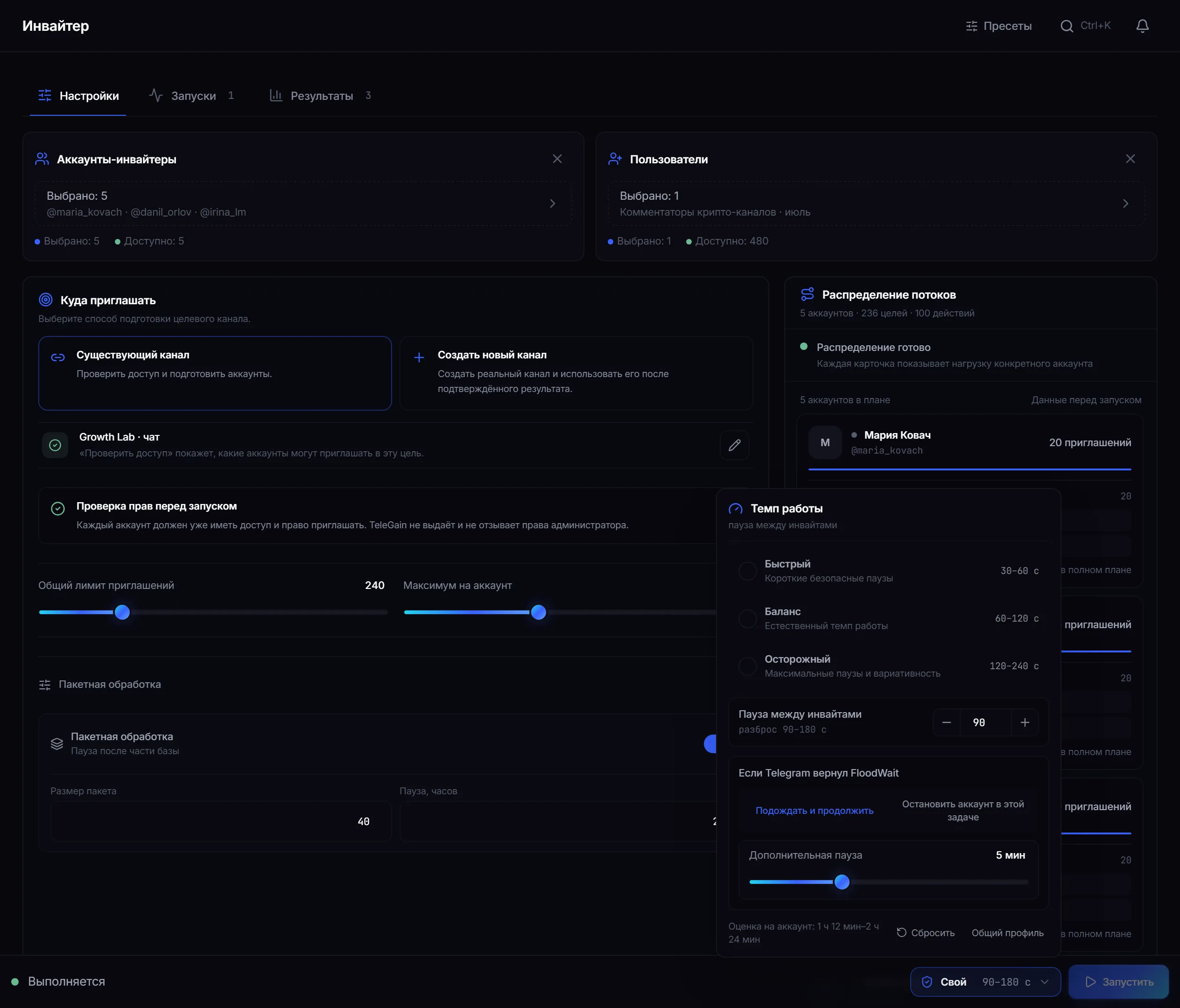
Pace: pause presets, a custom value with spread, the FloodWait policy and a per-account time estimate. If Telegram returns a FloodWait, there are two responses: wait and continue or stop this account for the current job. The other accounts keep working. An “extra pause” adds your own minutes on top of the delay Telegram named.
-
Start it and watch the threads.
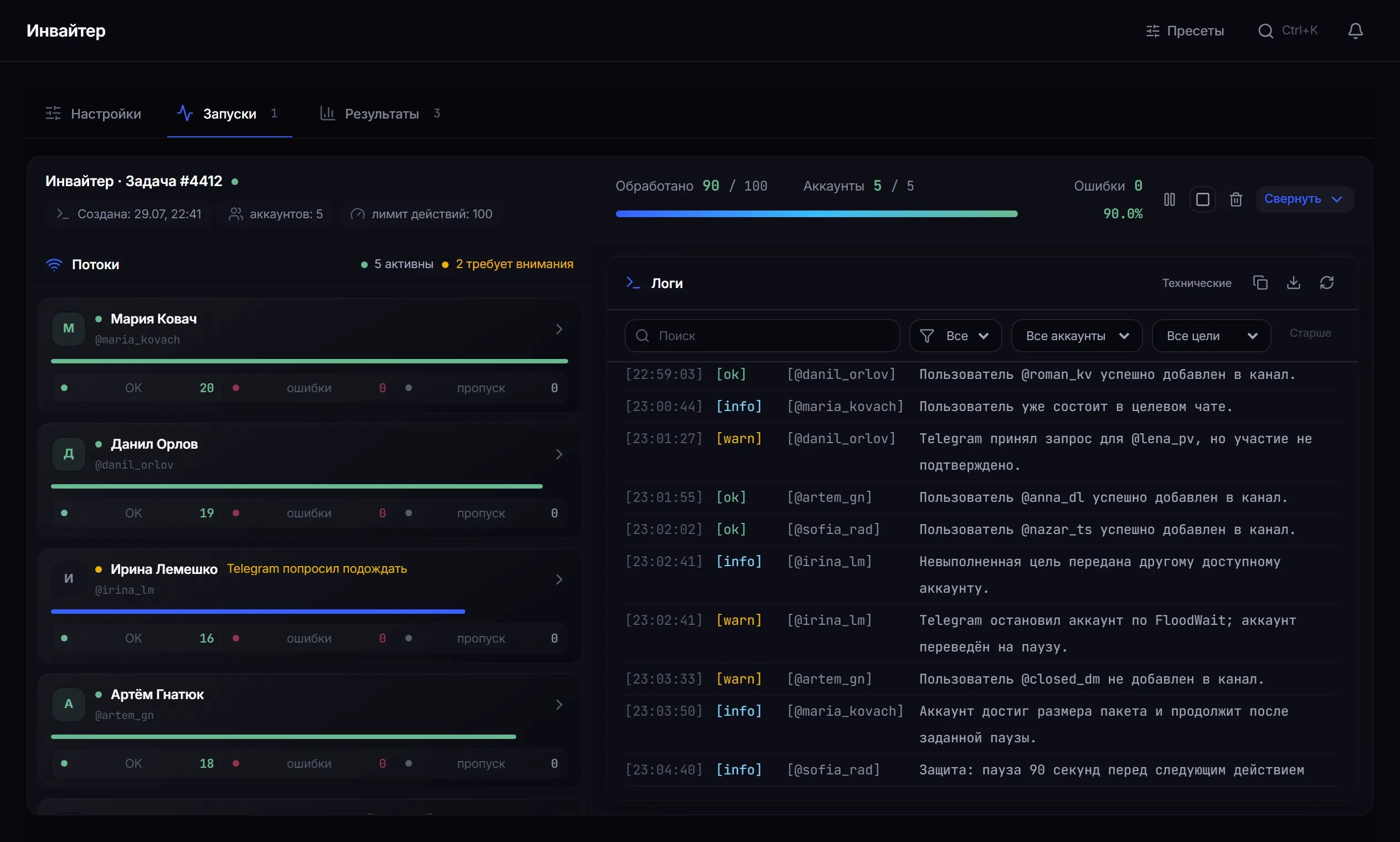
Runs: a separate line per account, counters and an event log by account and target.
Batch processing
Section titled “Batch processing”Batch processing splits an account’s work into parts: it sends a set number of invitations, then pauses for a number of hours and continues. This helps when the dataset is large and you want to stretch it over a day or more.
The pause is visible in the log as “the account reached its batch size and will continue after the configured pause”, so silence in a thread never has to be guessed at.
How to read the results
Section titled “How to read the results”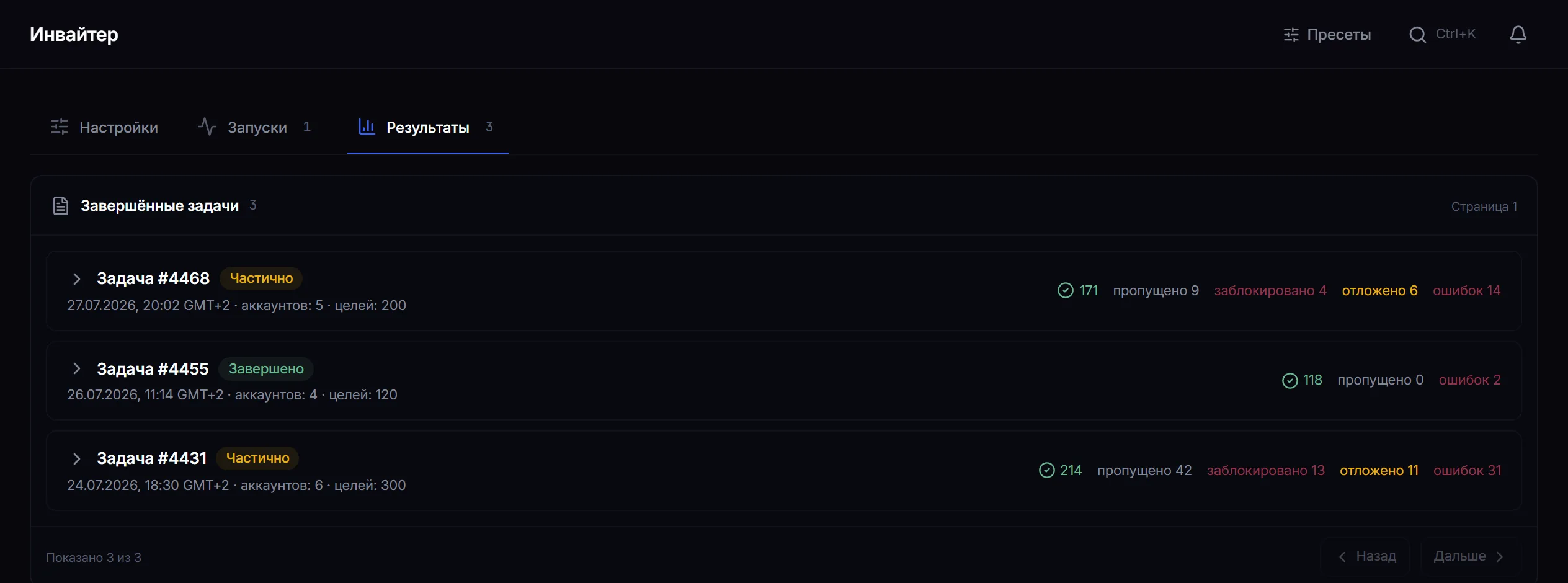
| Status | What it means |
|---|---|
| Success | the person was added and Telegram confirmed it. This also covers people already in the channel |
| Skipped | it never got as far as sending: a duplicate in the dataset, an exhausted limit or a stopped account |
| Blocked | protection stopped the action before contacting Telegram |
| Deferred | Telegram limited the attempt and the target was not closed in this run |
| Errors | Telegram refused, or membership was not confirmed after the request |
Deferred targets are what give a job the “Partial” status, even when there are few errors.
Why a person may not have joined
Section titled “Why a person may not have joined”- Their privacy settings forbid being added to groups and channels. This is the most common reason and it cannot be bypassed.
- They are already in the channel — the panel checks before sending, so no limit is spent.
- Telegram accepted the request but membership was not confirmed on re-check — this is recorded separately and never passed off as success.
- The account hit a FloodWait or an anti-spam warning and stopped in this job.
- The target appeared in the dataset twice — a repeat invitation is not sent.
A safe test run
Section titled “A safe test run”- Take two warmed-up accounts and a channel of your own where they can invite.
- Build a dataset of 10–15 people and choose the cautious pace preset.
- Run it and wait for completion.
- Open the results: the share of closed profiles shows the real quality of that dataset source.
Common mistakes
Section titled “Common mistakes”| Mistake | What happens |
|---|---|
| Launching on accounts that were not warmed up or rested | fresh sessions get restricted fastest |
| Checking permissions on one account and launching on ten | only the confirmed ones will work |
| Setting the total limit by eye, ignoring the per-account one | the plan comes out far smaller than expected |
| Judging a dataset by one run | the share of closed profiles differs several-fold between sources |
Limits, user consent and platform rules
Section titled “Limits, user consent and platform rules”An invitation adds a person to a community without their explicit request, so boundaries matter:
- Invite people to whom your channel is genuinely relevant. Presence in a collected dataset is not consent to being added.
- A user’s privacy settings are their decision, and the panel does not work around them.
- Telegram’s rules take precedence over job settings; mass invitations can lead to account restrictions.
- You are responsible for the content of the channel you invite people into.
See Responsible use.
Why is the launch button disabled? Usually the permission check has not covered every selected account yet. The hint under the button names what is missing.
Is a limit spent on people already in the channel? No. The panel checks membership before contacting Telegram, and such a person counts as a success without an invitation being sent.
What happens to the targets of an account that hit a FloodWait? Those it did not reach are handed to another free account.
Can I invite people into someone else’s channel? No. The selected accounts must already have the right to invite into that target.
What pace is safe? There is no single threshold. Start with the cautious preset on a small volume and watch how Telegram responds.
Can I stop one account without touching the others? Yes. Pause and stop apply to an individual line.
Related guides
Section titled “Related guides”- How to run a Telegram parser? — where to get a dataset of people
- How to warm up Telegram accounts? — preparing accounts
- How to build an account pool? — reusing the same selection
- Troubleshooting — FloodWait and the “Partial” status
Official module page: Telegram inviter