TeleTraff: How to run AI commenting in Telegram?
AI commenting leaves comments under new posts of the channels you select, from your accounts. You set the sources, the post-selection rule and the instruction for the text — the panel watches for publications and comments on the matching ones.
Below is the working launch sequence. The module overview lives on the AI commenting page.
What you need before launch
Section titled “What you need before launch”- Warmed-up accounts. Telegram restricts fresh and empty ones fastest — start with warmup.
- A proxy on every account. Without one the account will not run — see the proxy centre.
- Access to a language model if the text is generated: the panel’s shared provider or your own key.
- Channels with open comments. If discussions are disabled, the channel is skipped.
How to launch
Section titled “How to launch”-
Select accounts and target channels.
One account runs one thread and watches a limited number of channels at a time — the panel shows the cap during selection. If there are more channels than your accounts can carry, the extras simply will not be picked up: add accounts rather than raising the pace on the current ones.
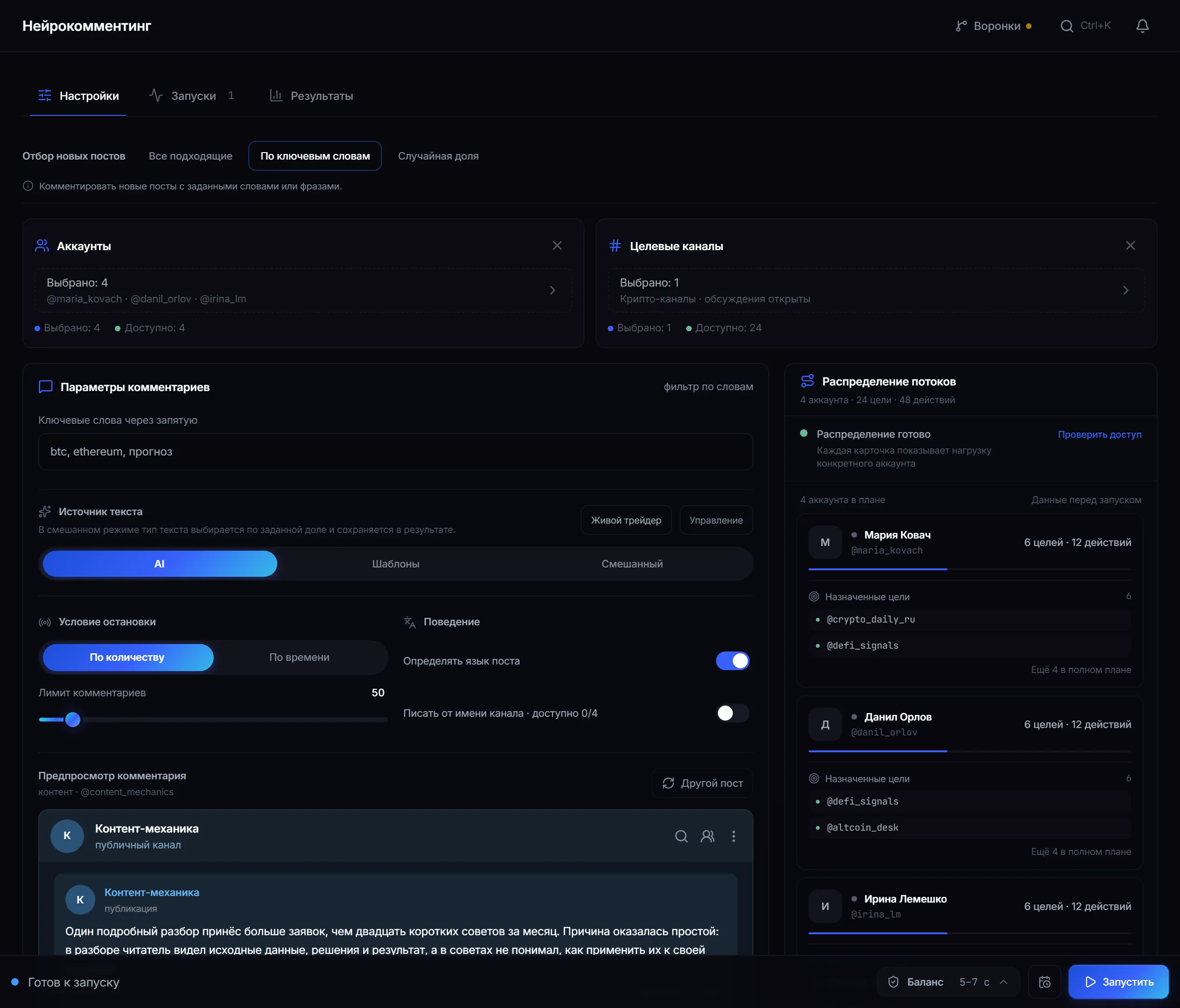
Launch settings: selection scenario, accounts, target channels, text source and comment preview. -
Set the post-selection rule.
Mode What gets commented All matching every new post from the source By keywords only posts containing your words or phrases Random share a share of new posts, the proportion is yours to set -
Choose the text source.
AI — the connected model writes by your instruction. Templates — your pre-written text is sent, no model needed. Mixed — the type is chosen by a set proportion and recorded in the result.
-
Check the thread distribution.
The panel builds a plan in advance: how many targets and actions fall to each account and which sources are assigned to it. The load is visible before the start, so it can be rebalanced.
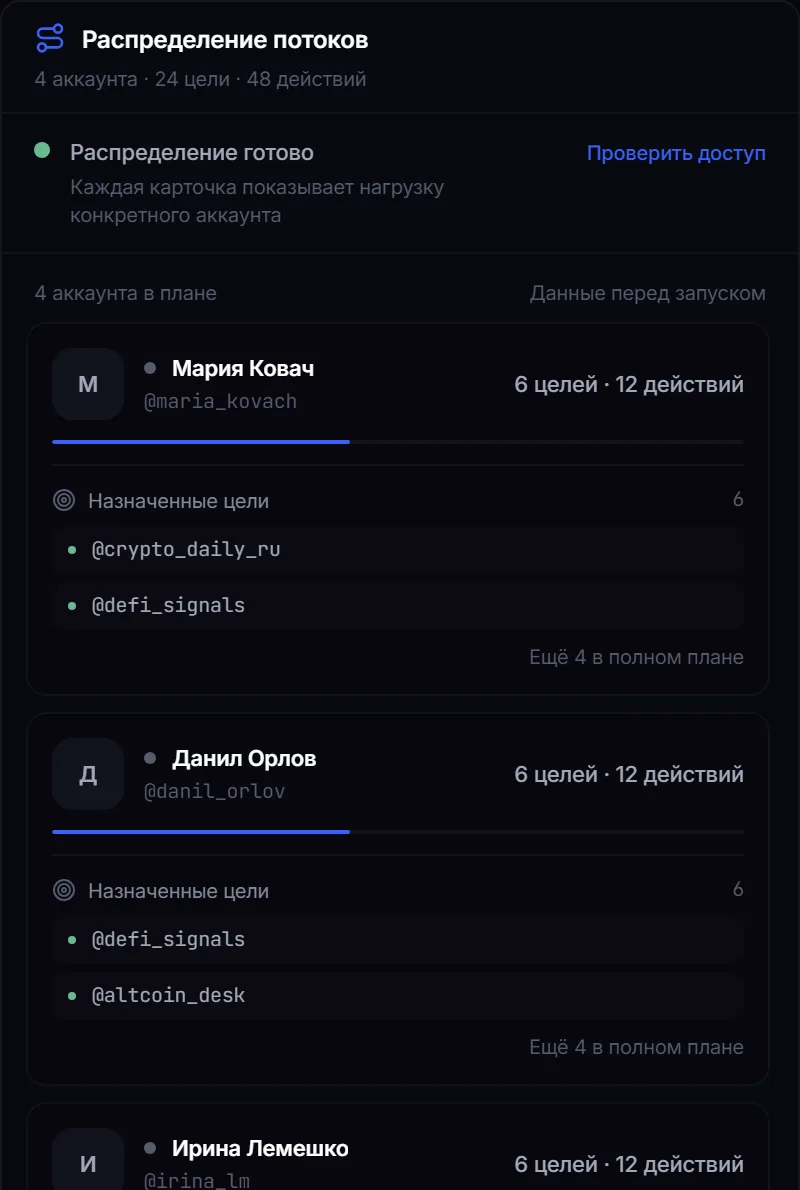
Thread distribution: how many targets and actions fall to each account. -
Start the job and watch the threads.
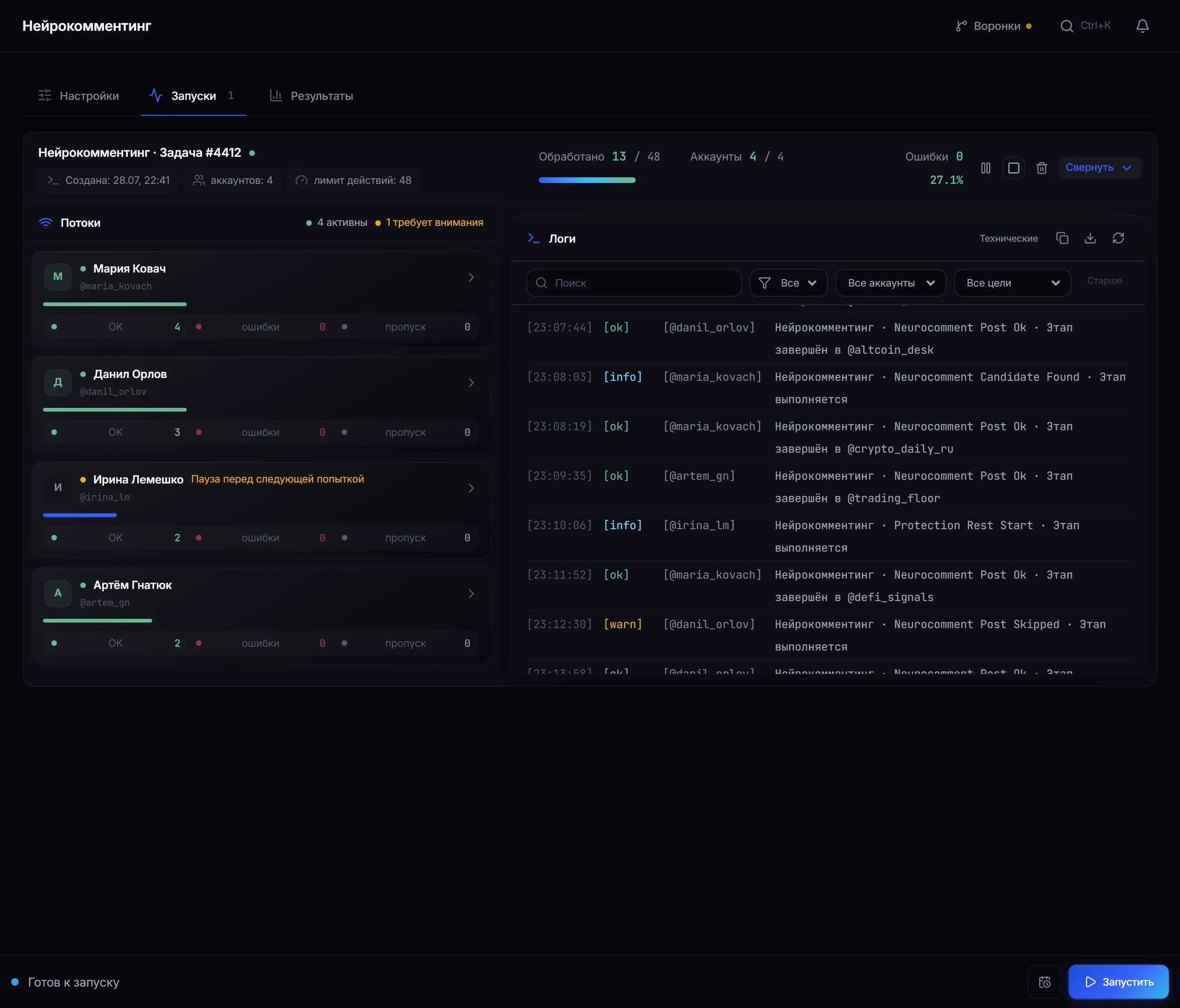
Runs: the state of every thread and an event log by account and target.
Why the module only takes fresh posts
Section titled “Why the module only takes fresh posts”On start it records what has already been published in the channel and then waits for new posts, polling the sources. It deliberately leaves older ones alone: a comment under a post that has just gone out sits at the top of the discussion and catches readers, while a reply under yesterday’s post sinks down the thread.
How to write the prompt
Section titled “How to write the prompt”- Describe who is writing and why they read this channel — the reply comes out meaningful rather than neutral.
- Ask for one or two sentences strictly on the topic of the post: long comments look unnatural.
- Explicitly forbid filler like “great” and “thanks for the post” — that is exactly what gives a bot away.
- Do not ask for links: comments with links collect complaints fastest.
A safe test run
Section titled “A safe test run”- Take two warmed-up accounts and one channel of your own with open comments.
- Set selection to “All matching” and the calmest pace profile.
- Publish a test post in the channel and wait for the comment.
- Read the text in the log: it should read like a human reply on the topic of the post.
This checks account access, model behaviour and prompt quality at once — without loading anyone else’s channels.
Why a target may be skipped
Section titled “Why a target may be skipped”- No new posts appeared in the source during the observation window.
- The post did not match the keywords or fall into the random share.
- The account hit its daily action limit or is waiting out a pause between comments.
- The model did not respond or returned empty text — no comment is sent.
- Telegram restricted the action, or comments are closed on the target.
The reason for each target is visible in the run results. Common scenarios are covered in troubleshooting.
How the module protects accounts
Section titled “How the module protects accounts”The pace profile decides how fast an account works: the calmer the profile, the longer the pauses between comments, and every pause differs slightly from the previous one. The daily action limit and the night break are configured separately. If Telegram asks to wait (FloodWait), the thread pauses instead of pushing the account further.
Common mistakes
Section titled “Common mistakes”| Mistake | What happens |
|---|---|
| Launching on accounts that were not warmed up | restrictions arrive fastest |
| Too many channels per account | the extras simply are not picked up |
| Identical text from every account | obvious to readers and to anti-spam alike |
| Links in comments | the shortest path to complaints and restrictions |
Limits, user consent and platform rules
Section titled “Limits, user consent and platform rules”Commenting takes place on someone else’s ground, so it is worth settling the boundaries in advance:
- Comment only where the channel owner does not object to such activity. Open discussions are not consent to automated comments.
- Telegram’s rules and the rules of the specific community take precedence over panel settings.
- The module does not bypass Telegram’s restrictions: if comments are closed or the account is limited, the panel shows it rather than forcing through.
- Responsibility for the content of comments lies with the operator — an instruction to a model does not remove that.
See Responsible use.
Does the module comment on old posts? No. On start it records what has already been published and then waits only for new posts.
What if the model does not respond? No comment is sent and the reason stays in the results. A template placeholder is never substituted for a model reply, so one provider error does not turn into a series of identical comments.
Can two accounts comment on the same post? No. Within one job a post goes to a single account.
Is Telegram Premium required? Not for ordinary work. Premium is only needed for the comment to appear on behalf of a channel linked to the account.
Can it work without an AI provider? Yes, in template mode. AI and mixed modes require access to a model.
Is it obvious that a model writes the comments? It depends on the instruction. Generic phrases, identical text and off-topic replies give automation away.
Related guides
Section titled “Related guides”- How to warm up Telegram accounts? — preparing accounts for commenting
- How to run a Telegram parser? — where to get the source list
- How to set up proxies for Telegram accounts? — a launch prerequisite
- Troubleshooting — what skips and FloodWait mean
Official module page: AI commenting